

For SRE, platform, and engineering teams
Every incident gets
an AI investigator.
WHAWIT connects read-only to Datadog, CloudWatch, Sentry, and 20+ tools you already run. Its Radar agent investigates root cause across your logs, metrics, and code while your team coordinates the response in Slack, Teams, and the IDE.
Read-only access · 20+ integrations · No rip-and-replace
A 60-second tour of WHAWIT: it connects read-only to the tools a team already runs, investigates an incident with cited evidence, and pages the on-call engineer with the root cause already attached.
Trusted by enterprise teams




Works on top of the stack you already run






The bake-off
Run us against anyone.
Every AI SRE demo is rehearsed — including ours. So we published the evaluation rubric we ask prospects to score us on — seven incident scenarios built from your real outages, ten scored dimensions — and a capability matrix of the entire field, including the rows we lose. Replay your incidents. Score everyone blind. We'll take the lineup.
Root cause, with the evidence attached.
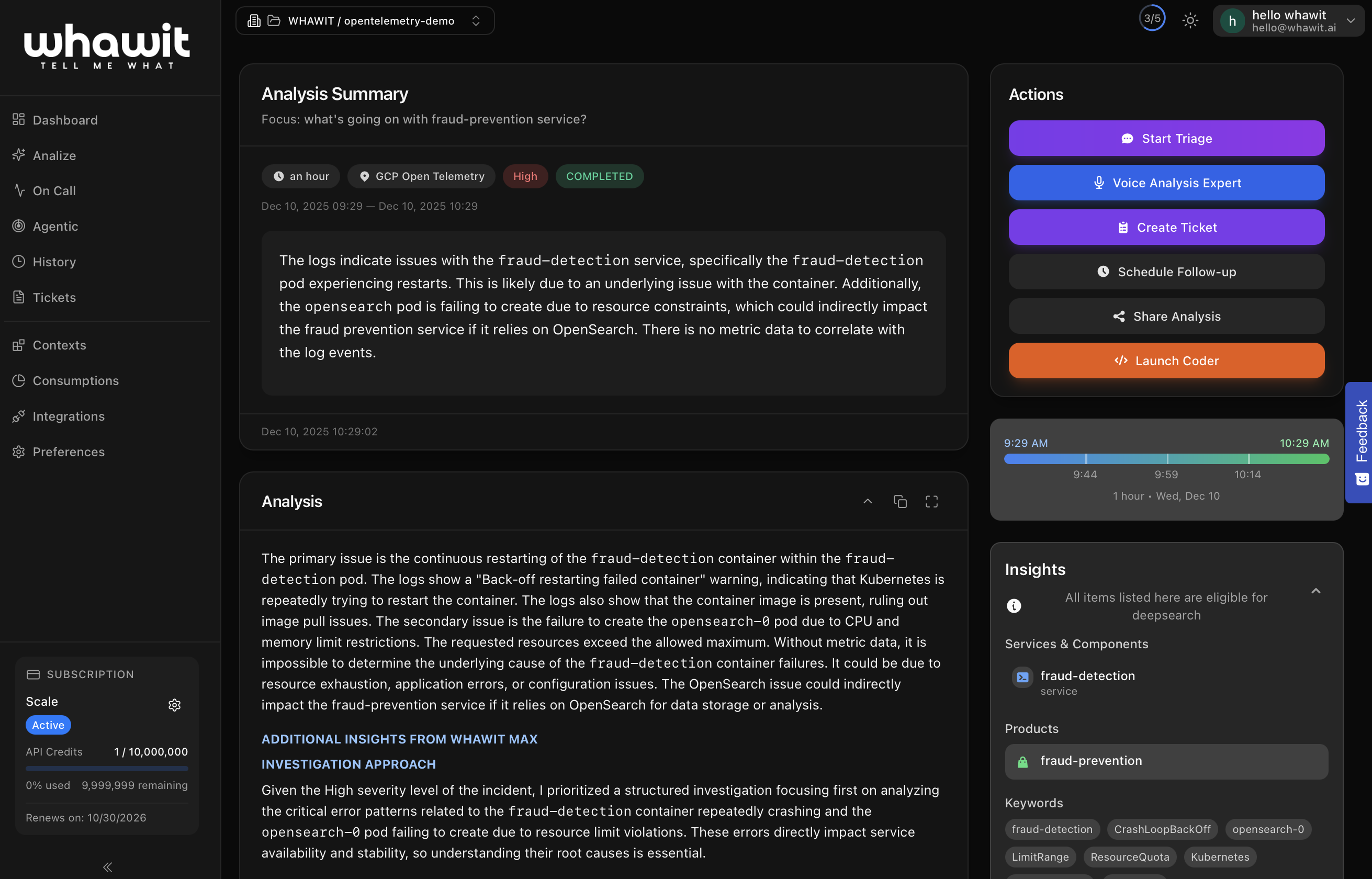
When an alert fires, Radar runs a multi-step investigation across your logs, metrics, and repository. It comes back with a root-cause hypothesis, a confidence level, and the evidence behind it, so your team reviews a conclusion instead of starting from a blank dashboard.
Ask follow-up questions in plain English. Radar keeps context for the whole incident.
On-call is built in, not bolted on.
WHAWIT runs your rotations. Schedules, layers, overrides and escalation policies are native features, so you do not need PagerDuty or Opsgenie alongside it. When a level goes unacknowledged past its timeout, WHAWIT escalates on its own.
And it is agentic, not a rulebook. A standing team of AI agents works the incident before the page goes out — reasoning about what to check next instead of following a runbook you had to write first — so the WhatsApp or SMS that wakes you carries the root-cause hypothesis, the evidence and a suggested fix.
Checkout API — error rate 14% for 6 min
What WHAWIT found
Connection pool exhausted on orders-db since the 02:58 deploy. Pool size dropped 50 → 10 in config/database.yml.
Suggested fix: roll back deploy #4821 or restore the pool size.
No ack in 10 min → escalates to Secondary
Declare, coordinate, and learn in one place.
AI agents watch your signals, deduplicate noise, and open incidents automatically. WHAWIT pages the responder from its own on-call schedules, spins up the channel in Slack or Microsoft Teams, assigns roles, keeps the timeline, and drafts status updates and the postmortem, so responders respond instead of narrating.
Migrating? WHAWIT also ingests alerts from OpsGenie and PagerDuty so you can move rotations over on your own schedule.
See the response workflowEvery incident becomes institutional memory.
WHAWIT keeps a governed memory of how your systems fail and how your team fixes them. It syncs runbooks from GitHub, distills resolved incidents and postmortems into reusable learnings, and verifies remediation procedures over time. Agents retrieve all of it — with citations — in every investigation, so the second time something breaks, the fix starts where the last one ended.
Next: Production Graph. A living map of your services, dependencies and environments — your production model — so every memory, procedure and investigation is grounded in the topology it belongs to.
Cited in 34 investigations this month · retrieved with provenance, never as instructions
IDE & MCP
The only incident responder that lives in your editor
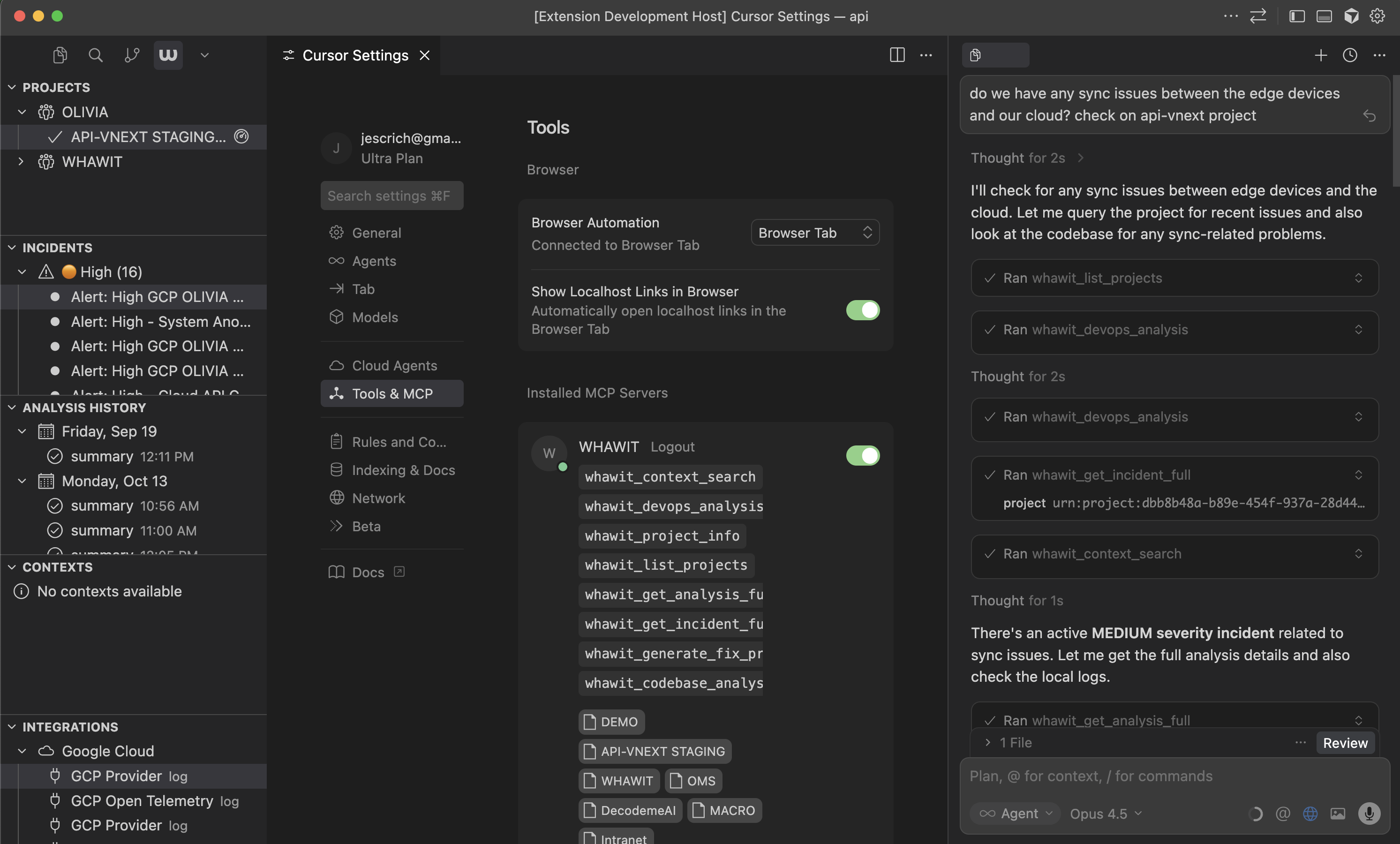
Fixes happen in the editor, so WHAWIT meets engineers there. Query the incident, read the evidence, and draft the fix without leaving the file you're editing.




Integrations
Reads from everything you already run
Read-only connections. Connect one provider or all of them.
Observability & logs
DatadogNew RelicAWS CloudWatchGCP Cloud LoggingAzure App InsightsSentryGrafana · Prometheus · Loki (via MCP)OpenTelemetryHoneycombBetterStackHerokuVercelNetlifyMongoDBElasticSplunkCode & tickets
 JiraAzure DevOps
Response & paging
How it works
Live in an afternoon, not a quarter
WHAWIT layers onto the tools you already run. Connecting a provider takes minutes; the first investigation follows on your next alert.
Connect
Add read-only keys for any of your 20+ providers. No agents to install, no data migration, nothing to rip out.
Radar investigates
On-call AI agents watch your signals, deduplicate noise, open incidents, and run root-cause investigations with the evidence attached.
Your team resolves
Coordinate in Slack or Teams, fix in the IDE, and close the loop with synced tickets and a postmortem draft.
Pilot it with the person who built it

Jose Escrich has spent more than 25 years building and operating enterprise systems where downtime, noise, and slow incident response carry real cost.
He runs every pilot personally: onboarding, architecture and security review, and evaluation against your real incidents before a broader rollout.
Start a pilot conversation- Founder-led onboarding for every pilot
- Security and architecture conversations up front
- Evaluate on real incidents before any rollout
Reference conversations, deployment guidance, and security review materials are available during the pilot process.
Security & Compliance
Built to pass your security review
Your data stays yours. WHAWIT is built so security, privacy, and deployment questions can be answered early, not after rollout.
SOC 2 Readiness
Trust Services Criteria for Security, Availability and Confidentiality, with a Type I audit targeted for Q4 2026. Our current posture is published, including what is not yet in place.
Encrypted at Rest & Transit
AES-256 at rest, TLS 1.2+ in transit. Your telemetry is never used to train generalized AI models.
Read-Only Ingestion
WHAWIT reads your observability providers with read-only credentials. Anything that writes — a fix branch, a ticket, an incident sync — is a separate action you authorise and can see.
Dedicated Instances
Enterprise customers get their own API and worker services, their own database and their own domain, with non-members rejected at the edge.
Security review materials and architecture walkthroughs are part of every pilot. Read the Trust Center.
See Radar investigate your incidents
Run a pilot against your real stack. Connect a provider read-only and watch Radar work your next incident, from first alert to root-cause hypothesis, before any rollout decision.